Free vs Paid AI Tools: When Is Upgrading Worth It?
Compare free vs paid AI tools using complete cost, measurable workflow value, critical controls and a practical upgrade break-even calculator.
Upgrade when a verified limit costs more than the complete paid plan
A paid AI tool is worth it when a tested workflow creates enough recoverable value to cover licences, implementation and administration—and the paid tier satisfies every critical data, access and contractual requirement. Feature count alone is not a business case.
Estimate the value of removing a free-plan limit
Use observed workflow data where possible. This calculator runs only in your browser and does not transmit or store the values.
Free vs paid AI tools should be compared around a defined workflow, not a list of features. A free plan is often the right choice while a person is learning, validating occasional use or gathering evidence. A paid plan becomes defensible when a specific limit blocks valuable work, the complete upgrade cost is covered and the exact tier meets every critical requirement.
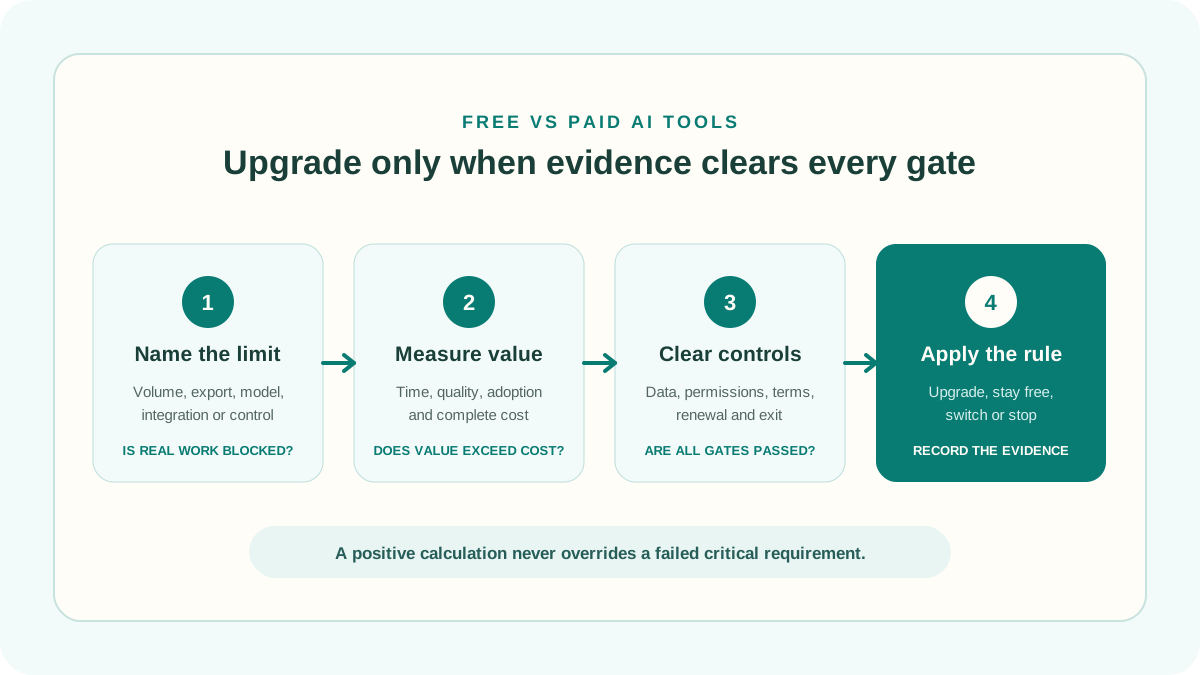
This guide provides a repeatable way to decide. Name the free-plan constraint, measure the work affected, test the paid tier, include implementation and administration, and set an exit rule. Use the calculator above for the financial threshold, then apply the non-financial gates before approving a purchase.
1. What actually changes between free vs paid AI tools?
The word “paid” does not describe one standard package. A provider may charge for higher usage, faster processing, a different model, larger files, exports, integrations, shared workspaces, administration, support or contractual protections. Another product may include some of those capabilities free and charge for something else.
Compare the exact plans available to the intended account type. Record the plan name, billing interval, limits and review date. Do not assume that a feature shown on a product page is included in every tier.
| Decision area | Free plan question | Paid plan question |
|---|---|---|
| Capacity | Which limits are reached in normal use? | Does the new allowance cover expected volume without overage? |
| Workflow | Can results be exported or connected safely? | Does the integration remove work or merely move it? |
| Quality | Is the required model, context or file size available? | Does the paid capability improve measured output on representative cases? |
| Administration | Are accounts managed individually? | Are roles, logs, offboarding and centralized controls included? |
| Data | What terms and controls apply to prompts and outputs? | Does the exact tier support the approved retention and data-use position? |
| Commercial | Is use permitted for the intended purpose? | What renews, changes with volume and happens at cancellation? |
2. When staying on the free plan is the better decision
Stay free when the current plan completes the intended work with acceptable quality and without unsafe workarounds. Paying early does not create adoption, a repeatable process or a clear business need.
- The use is occasional and the limit rarely interrupts useful work.
- The user is still learning which workflow, output and review standard matter.
- The paid feature has not been tested on representative cases.
- The upgrade would buy unused capacity rather than remove a measured bottleneck.
- Several people want accounts, but no owner, policy or offboarding process exists.
- The intended use is not approved for the data or people affected.
A free plan can be a discovery environment, but it should not become an unofficial production system. If users share accounts, split files, paste data into unapproved services or create unmanaged integrations to stay below a limit, the answer is not automatically “upgrade.” Pause and redesign the workflow first.
3. Signals that an upgrade may be worth testing
A repeated, measurable constraint is a useful upgrade signal. For example, a team may lose time when a monthly allowance stops a proven transcription workflow, when required exports demand manual copying or when an approved administrative control exists only on a business tier.
Translate the signal into a testable statement: “The free limit prevents 120 eligible tasks per month; the paid tier should complete them while saving at least six reviewed minutes per task.” That statement can be measured. “The Pro plan has more AI” cannot.
Good upgrade evidence has four parts: a named limit, affected work volume, an observed outcome difference and a complete cost. If one part is missing, run a bounded trial rather than committing annually.
4. Calculate the complete paid-plan cost
Monthly price multiplied by seats is only the visible cost. Add implementation, training, data preparation, integrations, security or legal review, administration, support, overages, taxes where relevant and the time required to check or correct output. Annual discounts reduce price only when the tool remains useful for the full commitment.
Use the AI software pricing guide and calculator for a detailed cost model. Confirm whether the quote is per user, workspace, usage unit or combination. Identify minimum seats, platform fees, credit expiry, rate limits and which actions consume credits.
Also value switching and exit. Exporting work, removing integrations, retaining required records and retraining users can make a cheap plan expensive to leave.
5. Measure the free-plan limit before pricing its removal
Track interruptions for a representative period. Record the task, user, limit encountered, work abandoned or delayed, workaround time and final outcome. Separate useful demand from experimentation. A person repeatedly regenerating low-value output should not be treated as evidence for more capacity.
For each task unlocked by the paid plan, measure the end-to-end difference: preparation, prompting, processing, review, correction, transfer and failure handling. Apply a realization factor because saved minutes do not always become productive capacity. The calculator uses that conservative adjustment rather than valuing every theoretical minute at 100 percent.
6. Do not multiply an individual benefit by every employee
A useful personal subscription does not prove that every team member needs a seat. Roles have different task volumes, skills, data access and review responsibilities. Begin with the smallest group that represents the workflow, then assign licences from observed use.
- Use named accounts rather than shared credentials.
- Define who can create integrations and change workspace settings.
- Track active workflow use, not logins or allocated licences.
- Reclaim seats when people change roles or stop using the approved process.
- Keep reviewers in the cost model even if they do not operate the tool directly.
Volume discounts can encourage shelfware. Compare the marginal saving from a larger contract with the cost of unused seats and reduced flexibility.
7. Treat privacy, security and terms as gates
A positive return estimate cannot compensate for an unacceptable data practice or missing control. Complete the AI tool privacy and security checklist for the exact tier. Confirm permitted data, provider use, retention, deletion, access, authentication, logs, integrations, incident handling and any contractual requirements.
NIST’s voluntary AI Risk Management Framework organizes risk activity around Govern, Map, Measure and Manage. That structure is a useful reminder that buying access is not the same as governing a system in its real context. The UK Information Commissioner’s AI and data protection resources similarly emphasize assessing effects on people and data throughout the lifecycle.
For security procurement, CISA’s Software Acquisition Guide supports dialogue among procurement, security teams and suppliers. Use applicable organizational and legal requirements; these sources are frameworks, not approval of a particular product.
8. Test the actual paid tier under matched conditions
If paid capabilities or controls determine the decision, test that plan rather than extrapolating from the free version. Use representative and difficult cases, the same quality rubric and a fixed measurement period. Record settings, product version, model, prompts and integrations.
The 30-day AI tool evaluation checklist provides a structured pilot. A shorter trial may work for a bounded, frequent task, but it still needs a baseline, success threshold, stop conditions and enough cases to reveal failures.
Before starting a trial, record the end date, conversion price, billing interval and cancellation method. Set a reminder early enough to review the evidence rather than letting automatic conversion make the decision.
9. Apply a decision rule without moving the threshold
Define the rule before results arrive. A practical rule is: upgrade only if every critical gate passes, the paid tier produces the required outcome on the test set, realized value exceeds complete cost by the organization’s chosen margin and the result remains positive under a conservative scenario.
Use four possible decisions:
- Stay free: current use is sufficient and approved.
- Upgrade: evidence clears the financial, quality and risk thresholds.
- Switch: the need is real, but another product or plan fits better.
- Stop: the workflow lacks value or fails a critical requirement.
For a broader financial assessment, transfer the observed values to the AI tool ROI calculator. Test lower adoption, smaller time savings, higher administration and an earlier exit than the optimistic case.
10. Plan renewal, downgrade and exit before purchase
Document who owns the subscription, where invoices and terms are stored, when the plan renews and who reviews continued use. Record the steps required to export necessary content, remove connected systems, delete or retain data, close accounts and notify affected users.
Review actual use before renewal. A tool that justified its first year can become redundant after workflow changes, price increases or the purchase of another platform with overlapping features. Do not use historical enthusiasm as evidence of current value.
11. Three free vs paid AI tool examples
Solo user with occasional limits
A consultant reaches a message limit twice a month but can move non-urgent work to the next day. The interruption has little measurable cost and no required paid-only control. Staying free is reasonable until demand becomes frequent or time-sensitive.
Small team with a proven repetitive workflow
Five users test a paid tier on matched cases. It removes a capacity limit, saves reviewed time and recovers setup plus recurring cost under conservative assumptions. Required data and account controls pass. A limited paid rollout with a renewal review is defensible.
High apparent ROI with an unresolved data condition
A calculator shows large savings, but the team cannot confirm whether the intended customer data may be used under the exact plan. The decision is “do not approve yet.” Financial value does not override the unresolved gate.
Common free vs paid AI tools mistakes
- Upgrading because a promotion or trial is ending.
- Comparing feature counts instead of the required workflow.
- Assuming the most expensive tier produces the best output.
- Ignoring setup, review, administration and exit costs.
- Buying a seat for every employee before measuring role-specific use.
- Valuing all saved minutes as cash or revenue.
- Testing the free plan while approving paid-only controls from marketing claims.
- Using annual billing to create savings before product fit is established.
- Keeping duplicate subscriptions that solve the same task.
- Allowing a positive ROI estimate to hide a critical risk.
Free vs paid AI tools FAQ
Are paid AI tools always better than free tools?
No. Paid plans usually change limits, functions, controls or service terms, but the value depends on the use case. A free plan can be the better choice when it completes approved work reliably and an upgrade would add unused capacity.
How much use justifies an AI subscription?
There is no universal task count. Use the price, seats, complete operating cost, measured time or quality difference and the share of value the organization can actually realize. The break-even calculator estimates the threshold.
Should I pay annually for a lower monthly price?
Only after product fit, continued demand and exit requirements are established. Compare the discount with the value of flexibility and the risk of unused months or seats.
Can a business use a free AI plan?
That depends on the provider’s current terms, the intended data and workflow, and applicable organizational and legal requirements. Verify the exact plan rather than assuming that free access permits every business use.
What if the paid plan saves time but output quality falls?
Measure the complete workflow, including review, correction and the consequences of errors. Reject or redesign the case if the required quality threshold is not met, even when raw generation is faster.
Methodology and limitations
ScoutChoice’s free vs paid AI tools framework separates a financial estimate from critical approval gates. Monthly paid cost equals price per user multiplied by paid users, plus monthly administration. Realized monthly value equals users multiplied by extra useful tasks, minutes saved, loaded hourly value and the selected realization factor. First-year net value subtracts twelve months of recurring cost and one-time setup.
The calculator is an educational estimate. It does not verify prices, quality, security, legality, tax treatment, contract terms or whether time becomes cash. Values remain in the browser and are not stored by ScoutChoice. Confirm current plan details with the provider, use observed evidence and obtain appropriate internal or professional review for consequential decisions.
Check fit, cost, risk and evidence together
Use the upgrade estimate as one input—not as a substitute for testing the workflow and the exact plan.