How to Build an AI Stack Without Paying for Duplicate Features
Build a lean AI stack by inventorying tools, mapping primary jobs, measuring usage and cost, finding overlap and testing consolidation safely.
Give every tool one job, one owner and one measurable reason to stay
Build an AI stack around workflows rather than products. Inventory cost and access, map each tool to a primary job, measure active use, identify overlapping jobs, then test consolidation without removing a unique control or breaking a dependable workflow.
Find inactive seats and potential duplication
Add up to six tools. The audit runs only in this browser and does not send or save entries. Shared primary jobs are review signals—not automatic cancellation recommendations.
Learning how to build an AI stack begins with workflows, not subscriptions. The goal is the smallest governed set of tools that completes required work reliably. More products can create duplicate spend, fragmented data, inconsistent output, extra integrations and accounts nobody owns.
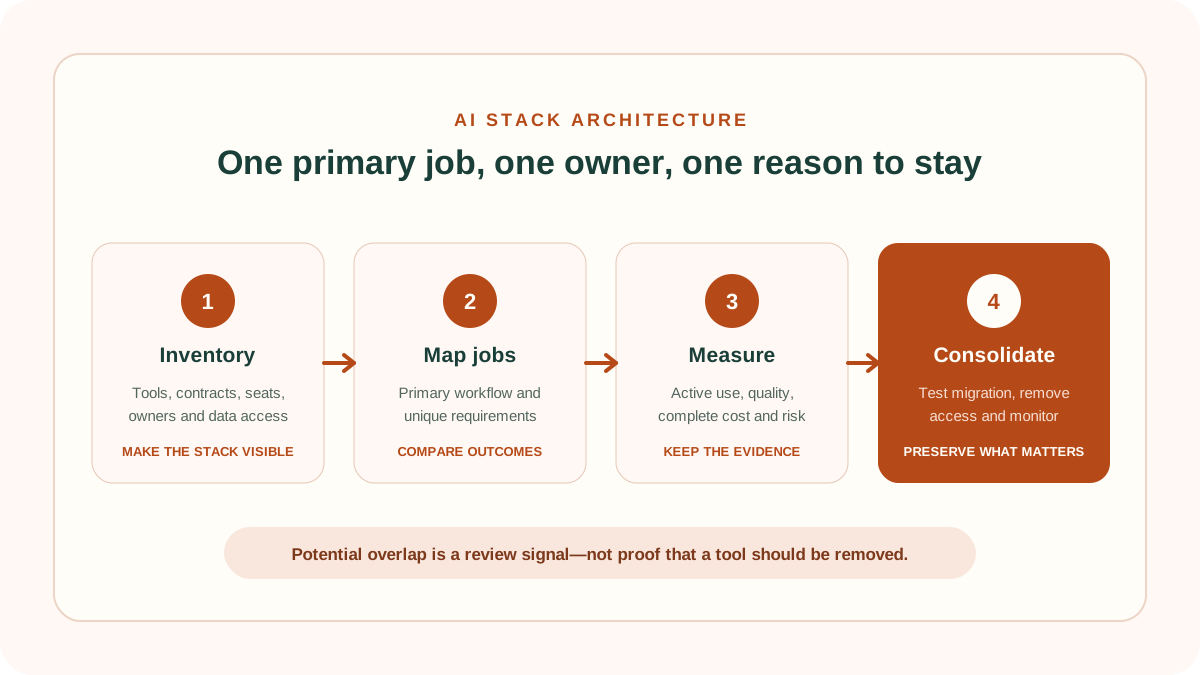
The method below makes the stack visible, assigns each tool a primary job, measures active use and tests consolidation safely. Use the interactive audit above as a first-pass review. It flags inactive seats, shared primary jobs and missing ownership, but it does not assume that two products in the same category are interchangeable.
1. Define what an AI stack is for
An AI stack is the set of AI-enabled products, models, integrations, data connections and operating controls used to complete work. It includes visible subscriptions and embedded AI inside software the organization already pays for. A browser extension, meeting bot, API and feature bundled into a larger suite can all belong to the same stack.
Start with outcomes: prepare a reviewed support reply, summarize an approved meeting, search internal knowledge or create a first draft of code. A stack defined as “all our AI tools” is too broad to manage. A stack defined by workflows can be tested, costed and assigned.
2. Build one inventory before comparing features
Create one record for every tool and paid AI feature, including decentralized purchases and trials. Record the owner, users, price basis, renewal date, contract term, primary workflow, integrations, data accessed, output destination and exit method. Include free tools because they can create security and data obligations even when invoice cost is zero.
When deciding how to build an AI stack, the inventory is the shared source of truth. Without it, teams can compare only the products they remember and miss bundled features, individual purchases or unmanaged free accounts.
NIST’s Cybersecurity Framework 2.0 includes asset management within its Identify function. Its small-business guidance specifically recommends maintaining an inventory of hardware, software, systems and services. An AI stack inventory applies that visibility principle to the tools and connections supporting the workflow.
| Inventory field | Question it answers | Evidence |
|---|---|---|
| Owner | Who approves use, cost and change? | Named accountable person |
| Primary job | Why is the product in the stack? | Defined workflow and output |
| Usage | Is assigned capacity used? | Eligible tasks, active seats and volume |
| Complete cost | What does the product consume? | Licence, usage, administration and review |
| Access and data | What can the tool reach? | Accounts, scopes, retention and destinations |
| Renewal and exit | When can the decision change? | Notice date, export and deletion steps |
3. Map every product to one primary job
Most AI products advertise many features. Assigning a primary job prevents marketing breadth from becoming architecture. The job should be a workflow outcome, not a vague category such as “productivity.” Secondary capabilities can be recorded, but they should not justify the tool unless they produce measured value.
For each job, define the input, approved data, user, required output, quality threshold, review step and destination. Then compare products against that same specification using the ScoutChoice 12-point AI tool framework.
One primary job does not mean one feature. It means one accountable reason for keeping the tool. A specialist may remain beside a general assistant when it produces a materially better outcome or supplies a required integration, control or record.
4. Separate feature overlap from workflow duplication
Two products may both summarize text without duplicating the same workflow. One could summarize public research while another processes approved internal meetings with different access, retention and audit controls. Conversely, tools with different labels may duplicate the same practical outcome.
Test overlap at three levels:
- Capability: can both products perform the action?
- Workflow: can both meet the same input, quality, integration and review requirements?
- Operating fit: can both satisfy the required data, administration, reliability, terms and support?
Only the third level supports a consolidation decision. The audit above flags tools that share a primary job so the team knows where to investigate.
5. Measure useful activity, not logins
A login does not prove value, and a low login count does not always prove waste. Some specialist tools are used infrequently for high-value work. Measure eligible tasks completed, output accepted, time including review, error and rework, active seats, consumption and whether the workflow would stop without the product.
The FinOps Foundation’s Licensing & SaaS capability focuses on understanding licensing terms, use rights and pricing while minimizing under-deployment and shelfware through collaboration across finance, procurement, engineering and legal. Apply the same cross-functional evidence to AI subscriptions.
Review unused seats first because reclaiming them is usually less disruptive than removing a product. Then investigate products with no owner, no defined job, no current usage evidence or a renewal before the next review date.
6. Draw the data and output flow
Map where information begins, which tools receive it, what integrations can retrieve, where outputs are stored and which people or systems act on them. Duplicate features can create duplicate copies, retention periods and access paths even when cost is small.
Complete the AI tool privacy and security checklist for every product and connection that remains. The UK Information Commissioner’s guidance on AI security and data minimisation explains that AI can amplify known security risks and create specific minimisation challenges. Reduce unnecessary data movement, not only unnecessary licences.
7. Use a simple core-and-specialist architecture
A practical small-team stack often has a governed core product for common approved tasks, a limited number of specialists for workflows where they deliver a verified advantage, and an integration layer only where automation has an owner and monitoring.
This is the central architectural answer to how to build an AI stack without unnecessary duplication: standardize frequent general work, preserve specialists only for documented advantages and keep durable records in an approved destination.
- Core: broad, frequent work with standard access, support and administration.
- Specialist: a bounded task with a documented quality, control or integration advantage.
- System of record: the approved destination for durable files, decisions and customer or employee records.
- Integration: the minimum permissions required to move data or trigger an action.
- Control layer: ownership, approved uses, review, logs, incidents, renewal and exit.
Avoid chaining tools merely because connectors exist. Each additional transfer adds configuration, failure modes, access and troubleshooting. Automate only when the end-to-end workflow has been tested manually and the benefit exceeds the operating burden.
8. Test consolidation before cancelling anything
Select one overlap candidate and define what the remaining tool must reproduce. Use representative and difficult cases, including required formats, integrations, permissions and failure handling. Compare matched workflows rather than vendor demonstrations.
Run the 30-day AI tool evaluation checklist where the workflow is important or variable. Preserve an export and rollback path. Do not remove access, records or integrations until the replacement succeeds and affected users know the new process.
Consolidate in stages: reclaim inactive seats, prevent new purchases, migrate a small group, validate outputs and controls, then end the redundant contract. Monitor whether manual work, errors or shadow tools return after the change.
9. Compare complete stack cost with stack value
Add subscriptions, consumption, platform fees, implementation, administration, integration maintenance, user training, review and correction. Then remove double counting: the same saved hour cannot justify two tools, and a bundled feature is not free if it requires a more expensive suite tier.
Use the AI software pricing calculator for cost structure and the AI tool ROI calculator for risk-adjusted value. Calculate ROI by workflow and then reconcile it to the whole stack. A portfolio of individually attractive cases can still overstate total value when benefits overlap.
10. Turn renewals into evidence reviews
Maintain a calendar with review, notice and renewal dates. Schedule the evidence review early enough to change seats, export data and give notice. Assign one person to bring cost, usage, incidents, workflow changes and alternatives to the decision.
Use four outcomes: retain, resize, replace or retire. Record why the decision was made and the next review date. Annual discounts should follow stable demand; they should not be used to lock in an uncertain stack.
11. Three AI stack examples
Two general assistants with the same job
Both products support routine drafting, the same users and the same approved data. One has much lower active use and no unique requirement. Test the used product on the other’s representative tasks, export needed content and resize or retire the redundant plan if the matched test passes.
General assistant plus specialist meeting tool
Both can summarize, but the specialist reliably captures approved meetings, identifies speakers and connects to the required record system. The overlap is superficial if the general assistant cannot reproduce the complete governed workflow.
Bundled AI added to an existing suite
The new feature appears cheaper than a separate product. Include the suite-tier uplift, migration, output quality and changed data access. Consolidate only when the bundled feature meets the same threshold and the organization is comfortable with the additional dependency.
Common AI stack mistakes
- Buying products before defining workflows.
- Treating every similar feature as a duplicate.
- Ignoring AI embedded in existing software suites.
- Counting allocated seats or logins as useful adoption.
- Letting teams expense tools without an owner or renewal record.
- Comparing licence price while ignoring integrations, review and exit.
- Sending the same sensitive data through unnecessary tools.
- Automating a workflow before its failure handling is understood.
- Cancelling before exporting required records or testing migration.
- Keeping tools because they were once valuable rather than measuring current value.
How to build an AI stack FAQ
How many AI tools should a small business use?
There is no ideal number. Use the smallest set that meets defined workflow, quality, data and control requirements. Every tool should have an owner, primary job and evidence supporting its cost.
Should one AI platform replace every specialist tool?
Not automatically. A broad platform can reduce accounts and cost, while a specialist may deliver a necessary quality, integration or control advantage. Compare the complete workflows under matched conditions.
How often should an AI stack be audited?
Review before material renewals and whenever price, terms, models, integrations, approved data or workflows change. High-spend or high-risk tools may require more frequent monitoring.
Is a free AI tool part of the stack?
Yes, when it is used for organizational work or accesses organizational data. Zero invoice cost does not remove ownership, security, privacy, records or exit considerations.
What should be removed first?
Begin with inactive seats and tools that have no owner, defined job or current evidence. Do not remove a tool supporting a critical workflow until the replacement and rollback path are tested.
Methodology and limitations
ScoutChoice’s AI stack method combines an asset inventory, job-to-be-done map, usage review, complete cost, data-flow review and controlled consolidation. The browser-only audit calculates monthly cost from price per seat and assigned seats, inactive cost from assigned minus active seats, and potential overlap from products sharing a selected primary job.
The framework explains how to build an AI stack as a repeatable governance and value process, not a fixed list of products. Tool availability and features change, while the need to define work, evidence and ownership remains.
Potential overlap is not verified savings. The audit cannot measure output quality, switching cost, criticality, security, terms, integration fit or whether active-seat data is accurate. Confirm current product and contract details, use representative workflow evidence and involve appropriate owners before changing access or cancelling software.
Connect inventory, price, security and measured value
Audit the stack regularly and reopen the decision whenever usage, price, integrations or the workflow changes.