An AI tool implementation plan converts a successful pilot into a controlled production service. It names owners, freezes the approved scope, configures controls, prepares users and support, defines monitoring and keeps a tested fallback. Production is a new decision, not the automatic reward for finishing a trial.
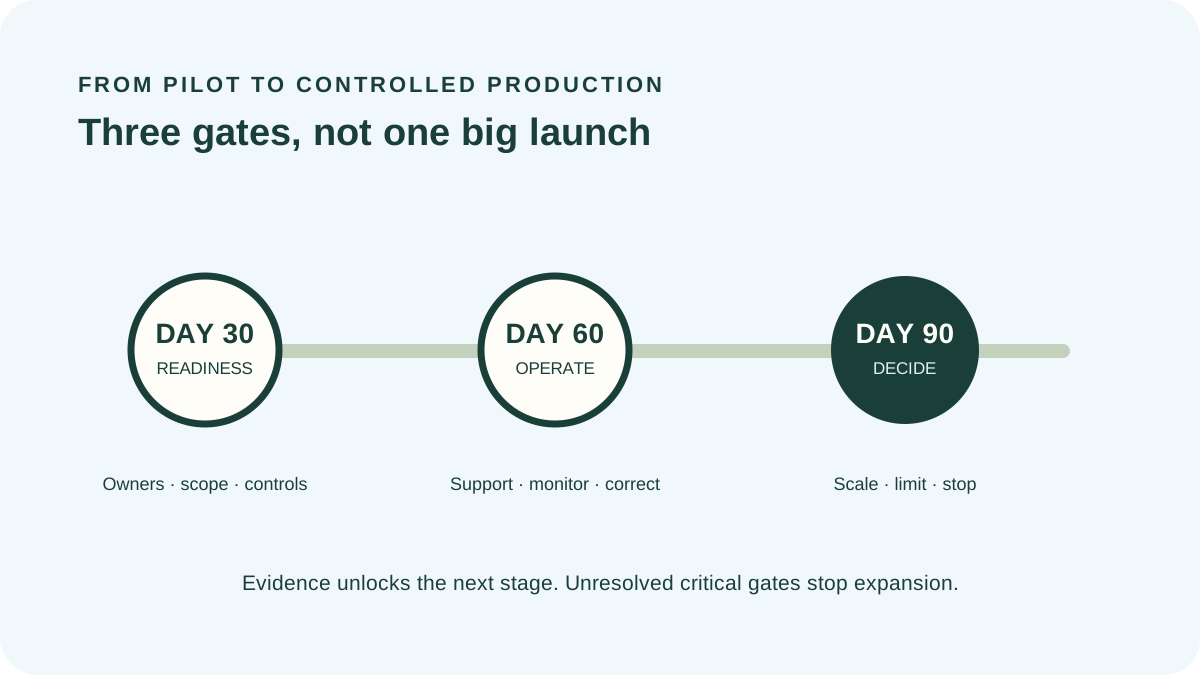
Use the 30–60–90 day tracker above as a sequence of gates rather than a fixed calendar. A small deployment may move faster; a consequential workflow may need longer. Expand only after the previous stage has evidence, an accountable decision and clear conditions.
1. Purpose of an AI tool implementation plan
The plan aligns the business outcome with the system people will actually use: product, plan, configuration, accounts, data, integrations, instructions, human review and support. Its output is not “rolled out.” It is a time-bounded operating decision with owners, metrics and stop conditions.
Keep the pilot record separate. The pilot asked whether the use might work under test conditions. Implementation asks whether the organization can operate it repeatedly with real users, change, incidents, cost and dependency.
2. Freeze the approved production scope
Record the legal supplier, service, plan, model or feature, region, users, administrators, workflow, data classes, integrations, output destination and permitted actions. State prohibited uses and data. Link the contract review, risk acceptance and pilot evidence.
Control scope creep. A writing assistant approved for public marketing drafts is not thereby approved for HR decisions or confidential customer records. Route material changes through the appropriate assessment instead of relying on the original brand approval.
3. Build the 30–60–90 day rollout
| Stage | Main objective | Decision |
|---|---|---|
| Days 0–30 | Ownership, configuration, instructions, fallback and readiness | Allow defined production cohort or hold |
| Days 31–60 | Supported use, monitoring, feedback and correction | Continue, limit or redesign |
| Days 61–90 | Compare outcomes, cost and risk with thresholds | Scale, maintain, reduce or stop |
Do not measure time from contract signature if access, integration or training is delayed. Record the date each stage genuinely begins and the evidence required to exit it.
Assign operational ownership
Name a business owner accountable for outcome and approved use, a technical owner for configuration and integration, and owners for access, support, data, risk, budget and vendor management. Define who can pause automation, approve exceptions and communicate incidents.
A steering committee does not replace individual accountability. Every recurring task and unresolved condition needs one owner and due date.
4. Configure controls before broad access
Set identity, authentication, role permissions, tenant sharing, retention, model-improvement options, connectors, logging and administrative alerts for the purchased plan. Capture configuration evidence and protect elevated access. Vendor defaults may optimize ease of adoption rather than the organization’s risk position.
Test the full workflow, including failure: inaccurate output, unavailable service, revoked permission, rate limit, malformed input, accidental sharing and harmful automation. Verify fallback, escalation and recovery without using restricted production information prematurely.
Training cannot compensate for a control the system should enforce. Use technical restrictions for permissions and prohibited actions, then teach people how to operate within them.
Prepare users, reviewers and support
Train with realistic permitted and prohibited cases. Explain data boundaries, verification, disclosure, human review, incident reporting and the limits of output. Reviewers need time, competence, evidence and authority to reject the system’s suggestion.
Publish concise workflow instructions at the point of use. Provide a named support route, expected response and escalation. Capture recurring questions as evidence of unclear design, not simply user resistance.
5. Monitor outcomes and trustworthiness
Measure output quality, workflow coverage, repeat use, verified time or cost effects, corrections, incidents, access anomalies, support load and provider changes. Use the AI adoption metrics dashboard to keep usage, value and risk visible together.
NIST’s AI RMF Manage guidance includes post-deployment monitoring, feedback, decommissioning, incident response, recovery and change management. Its playbook is voluntary guidance rather than a universal checklist; select actions that fit the context and preserve reasons.
Manage provider and model change
Monitor release notes, model changes, deprecations, subprocessors, terms, pricing and incidents. Re-run representative tests when a change can affect approved performance or risk. Maintain the prior safe configuration or fallback where practical.
Record drift in the workflow as well as the model: users may expand inputs, skip review, create shadow integrations or rely on output more heavily over time.
6. Make the day-90 operating decision
Compare production evidence with the baseline, success thresholds, total cost and approved residual risk. Choose scale, maintain, limit, redesign or stop. Document conditions, owner, next review, monitoring cadence and event triggers.
Do not scale solely because licenses have been purchased or because adoption is high. A widely used tool with poor acceptance, unverified savings or repeated incidents may require correction or retirement.
7. Implementation examples
Meeting assistant
Start with a defined group and meeting types. Configure notice, sharing and retention; measure transcript correction and follow-up quality; exclude sensitive meetings until separately approved.
Support drafting
Keep publication behind trained review, sample outputs by issue type and language, track incorrect advice and escalation, and expand only after quality remains within limits.
Internal search
Verify source permissions, citations, stale content and access logging. Treat unauthorized retrieval as a control failure even if answers appear helpful.
Common implementation mistakes
- Treating pilot approval as permission for every production use.
- Launching all users before support and monitoring exist.
- Relying on training while leaving excessive permissions enabled.
- Measuring logins without quality, value or risk.
- Ignoring provider and workflow drift after launch.
- Scaling because budget has already been committed.
- Operating without fallback, pause authority or exit plan.
AI tool implementation plan FAQ
The AI tool implementation plan remains useful after day 90 because its owners, thresholds and triggers become the operating record.
How long should implementation take?
Use risk, complexity and evidence rather than a universal duration. The 30–60–90 structure is a planning frame, not a deadline.
Who should approve production?
An accountable owner with appropriate authority, informed by technical, security, privacy, legal, operational and affected-team review as needed.
What is the difference between a pilot and rollout?
A pilot tests a defined hypothesis under limited conditions. Rollout establishes repeatable production ownership, controls, support and monitoring.
When should expansion stop?
When a critical gate, stop rule, risk tolerance, quality threshold or operating dependency is unresolved.
Methodology and limitations
ScoutChoice designed this AI tool implementation plan around three gates: readiness, supported production and evidence-based scale. Critical rollout gates override percentage completion. Tracker state remains in the current browser until reset.
This guide provides general operational information, not legal, security, privacy, employment or compliance advice. Adapt it to the system, organization, affected people and applicable obligations.