An AI tool offboarding checklist prevents a cancelled subscription from leaving accessible accounts, live integrations, retained data, broken workflows or unexpected renewal. Plan the exit while the service, staff and vendor support are still available.
Use the tracker above to coordinate the work, then preserve evidence in the approved system of record. “Delete workspace” should be a late step, after required exports have been tested and access, contractual, legal and retention needs are understood.
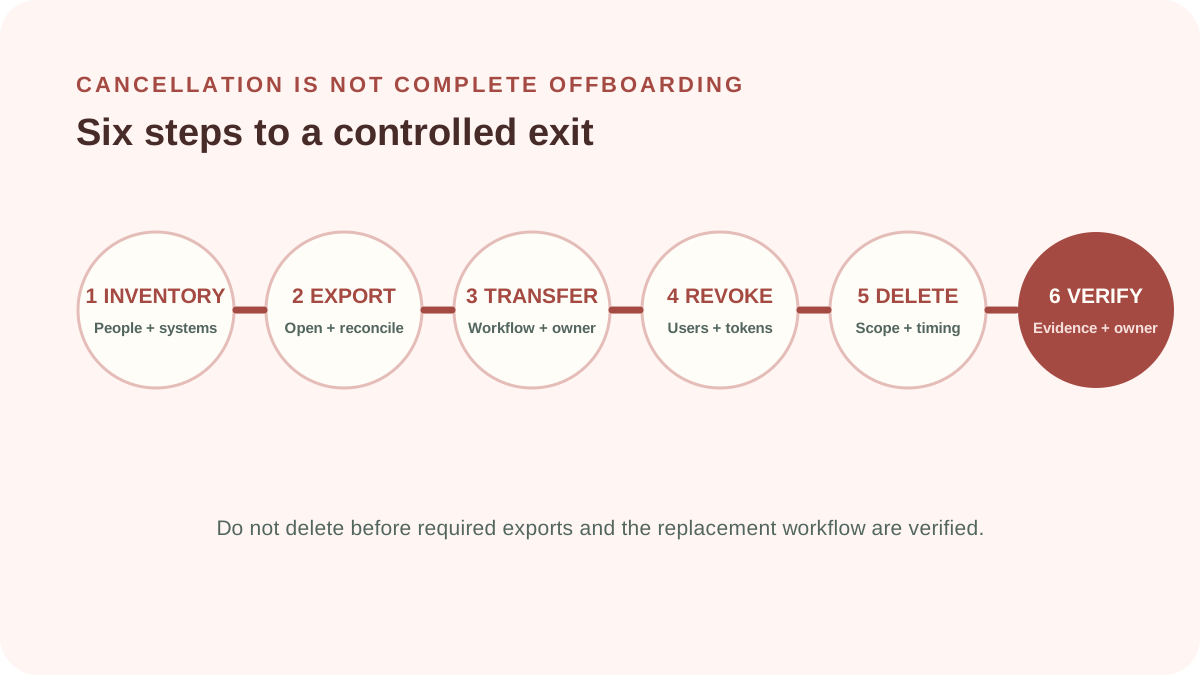
1. Purpose of an AI tool offboarding checklist
The objective is a controlled end state: authorized records retained in usable form, business workflow transferred, access and machine credentials revoked, integrations disconnected, billing ended, deletion handled and residual obligations owned.
Offboarding may follow consolidation, failed value, unacceptable risk, contract change, provider failure or replacement. Record the reason because it affects timing, evidence, communication and whether access should be frozen immediately.
2. Inventory the complete service footprint
Identify legal supplier, plan, workspaces, regions, administrators, users, guests, service accounts, APIs, tokens, browser extensions, mobile apps and embedded features. Map calendars, storage, email, CRM, support, identity and automation connections.
Find what the tool created or changed elsewhere: summaries, tickets, code, customer records, scheduled actions, knowledge bases and logs. Closing the vendor account does not remove downstream copies or reverse completed actions.
3. Create an exit sequence and freeze point
| Phase | Outcome | Evidence |
|---|---|---|
| Plan | Owner, scope, records, dependencies and timing known | Approved exit record |
| Export | Required information is usable outside the service | Opened sample and reconciliation |
| Transition | Workflow and users have a safe destination | Tested fallback or replacement |
| Revoke | Human and machine access is removed | Identity and integration checks |
| Close | Billing, deletion and residual duties are documented | Cancellation and closure evidence |
Set a freeze point after which no new records or actions enter the departing service. Coordinate read-only access when needed for reconciliation. Avoid an extended informal overlap where both systems become incomplete sources of truth.
4. Export and verify required records
Classify prompts, uploads, outputs, logs, user data, settings, templates, evaluations, incidents and decisions. Determine which records must be retained, returned, transferred, corrected or deleted. Export only what is authorized and necessary.
Test format, encoding, attachments, timestamps, identifiers and relationships. Open representative records in the destination and reconcile counts. A successful download is not proof of a usable or complete export.
Revoke human and machine access
Remove SSO assignments, local accounts, invited guests, administrators, shared passwords and recovery methods. Revoke API keys, OAuth grants, tokens, webhooks, agents and service accounts. Rotate connected credentials when exposure or shared use makes that necessary.
Disconnect integrations from both sides. Confirm that scheduled automations, email forwarding, calendar bots and browser extensions can no longer read data or take actions. Review logs for unexpected post-freeze activity.
5. Handle return, deletion and residual data
Follow the contract and applicable retention or deletion requirements. Request deletion or return through the specified channel and record tickets, dates, scope, exceptions, backup treatment and subprocessor timing. Do not promise absolute deletion without evidence.
The ICO’s guidance on controller–processor contracts says end-of-contract terms must address return or deletion of personal data and existing copies, subject to legal storage requirements. Jurisdictions and roles vary; obtain appropriate advice.
Separate live deletion from backups or archives. Document when residual copies are put beyond use and deleted under the provider’s cycle. Update the AI contract checklist with lessons for future purchases.
Close billing and commercial obligations
Check renewal date, notice window, minimum commitment, usage, credits, add-ons, storage and exit support. Obtain cancellation evidence and monitor the final invoice. Remove purchasing cards only after the contractual method has been completed and evidence retained.
Recover reusable licenses or reserved budget in the internal register. Record credits and disputed charges with an owner rather than treating account closure as financial completion.
6. Verify closure and update governance
Confirm the fallback works, exported records are accessible, accounts and tokens fail as expected, integrations are disconnected, renewal is cancelled and deletion status is documented. Record exceptions, residual risks, owners and dates.
Update tool inventory, data maps, risk register, budget, support documents, acceptable-use policy and incident contacts. Remove obsolete internal links and approved-tool listings so users are not directed back to the service.
Do not close the account before validating the export and replacement workflow. Urgent containment may require immediate suspension, but preserve evidence and authorized records under the incident process.
7. Offboarding examples
Meeting assistant
Export required transcripts and actions, migrate ownership, remove calendar bot access and OAuth grants, review shared recordings, cancel seats and document retention and deletion.
Writing platform
Export templates and approved content, preserve publication evidence, revoke browser extensions and team access, remove connected storage, cancel add-ons and verify workspace closure.
AI agent
Pause actions first, preserve logs, rotate credentials, disconnect tools, reconcile downstream changes and test the manual or replacement workflow before deletion.
Common offboarding mistakes
- Treating cancellation as complete offboarding.
- Deleting the workspace before testing exports.
- Removing user accounts but leaving API tokens or integrations active.
- Forgetting guests, service accounts and personal sign-ups.
- Assuming deletion includes backups and subprocessors immediately.
- Leaving the old tool in policies, documentation and approved lists.
- Failing to monitor the final invoice and renewal status.
AI tool offboarding checklist FAQ
The AI tool offboarding checklist should be tailored when a service handles sensitive records, autonomous actions or a workflow without an easy replacement.
When should offboarding planning begin?
During procurement and implementation. Test export and document account ownership before dependency grows.
Can the workspace be deleted immediately?
Only after authorized retention, export, legal hold, transition and evidence needs are addressed, unless urgent containment requires a different approved response.
How can deletion be verified?
Use provider confirmation, contractual evidence, administrative status and documented backup timing, recognizing that evidence and obligations vary.
Who owns offboarding?
A named business owner coordinates it, with identity, security, privacy, legal, records, procurement, finance and technical participation as relevant.
Methodology and limitations
ScoutChoice designed this AI tool offboarding checklist around plan, export, transition, access, data, commercial closure and verification. Critical gaps remain visible regardless of overall completion. State is stored only in the current browser.
This guide is general operational information, not legal, privacy, records, cybersecurity, tax or contractual advice. Adapt it to applicable requirements, the signed agreement and the actual service footprint.